As an entrepreneur, I’ve worked from quite a few coworking spaces over the years.
Some were beautifully designed but operationally chaotic. Others had great communities but frustrating systems behind the scenes. And in many cases, you could tell pretty quickly whether the operators had the right software in place… or whether everything was being held together with spreadsheets, Slack messages, and manual admin.
After testing various coworking spaces, I noticed one thing: the spaces that feel smooth and professional for members almost always have strong operational systems running quietly in the background.
Recently, I spent time properly reviewing Archie Coworking, one of the platforms in the coworking software space. I wanted to understand:
- Whether the platform genuinely solves operational problems
- Where it stands against competitors
- And whether I’d realistically recommend it to coworking operators today
Here’s the verdict.
What is Archie?
Archie is a workspace management platform with separate products for offices and coworking spaces. This review focuses specifically on Archie’s coworking software.
Source: Archie Coworking app
A lot of coworking operators struggle with disconnected systems and repetitive admin work across the entire business. Archie clearly understands that problem.
The coworking product is built around the full member lifecycle, from lead capture and contracts to membership management, bookings, and community engagement. Instead of stitching together five or six separate tools, Archie tries to centralize everything into one operational layer.
Archie Coworking Pricing
Archie’s pricing starts at:
- Starter: from $165/location/month
- Pro: from $257/location/month
- Enterprise: custom pricing
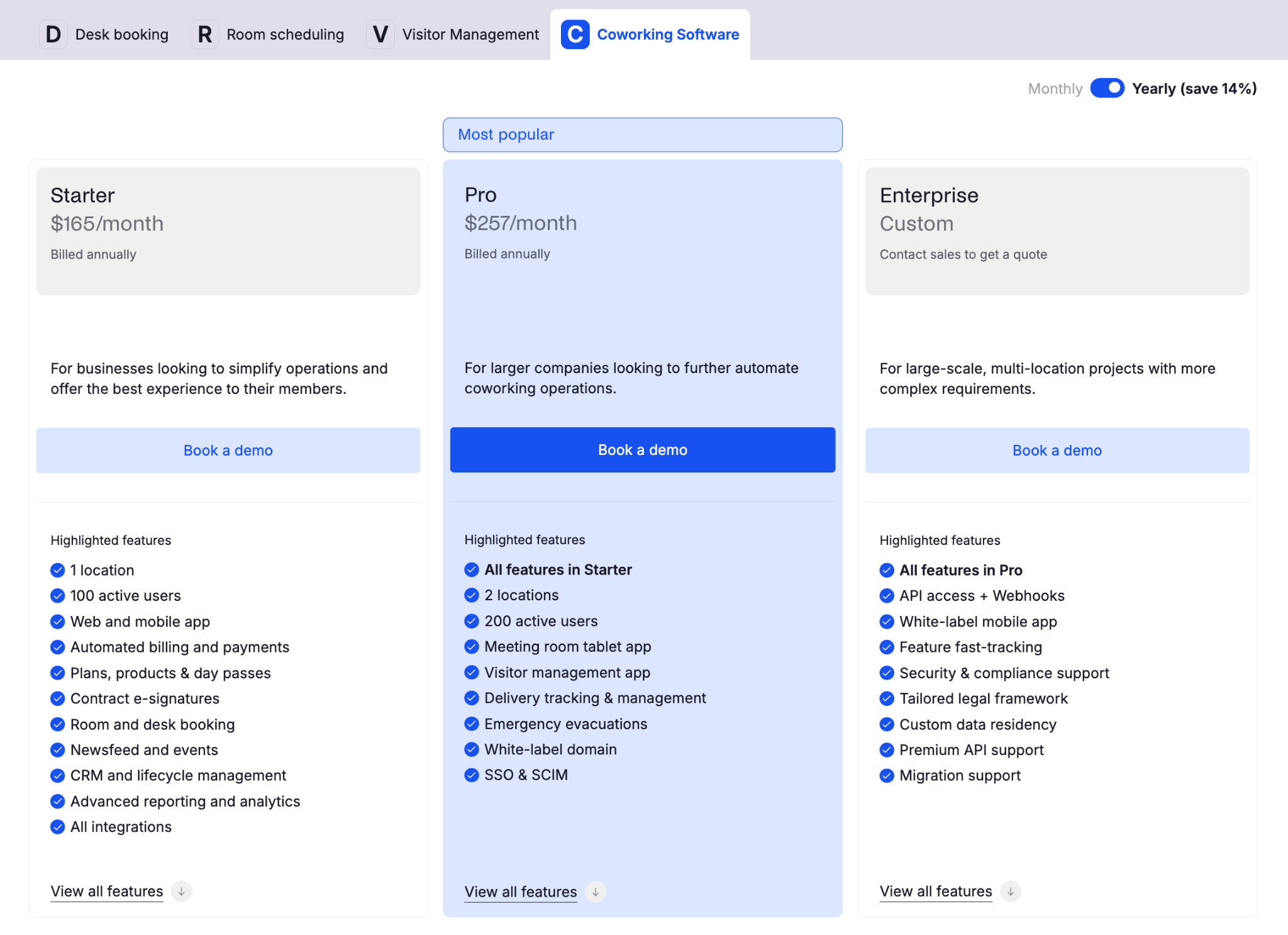
Source: Archie pricing page
The pricing is not the cheapest in the market, but I actually think the structure is fair once you understand what’s included.
Many competing coworking platforms charge extra for things that Archie includes natively: think e-signatures, CRM tools, or advanced automations. Plus, Archie is more upfront about the pricing than some of the competitors (like OfficeRnD, for example).
What Archie Does Really Well
Coworking automation across the full member lifecycle
This is probably Archie’s biggest strength. A new member can:
- Submit a lead form
- Schedule a tour
- Receive a quote
- Sign a contract
- Pay online
- Receive access permissions
- Get onboarding emails
- Start booking resources
…without your team manually coordinating every step.
That’s the part that genuinely reduces operational overhead. Especially once you scale to dozens or hundreds of members, those automations become extremely valuable.
Built-in e-signatures
This sounds small until you realize how annoying separate contract workflows usually are. Archie includes built-in e-signatures directly inside the platform, which means no additional DocuSign or Dropbox Sign integrations, no PDF exports, and no manual follow-ups.
Resource management is genuinely advanced
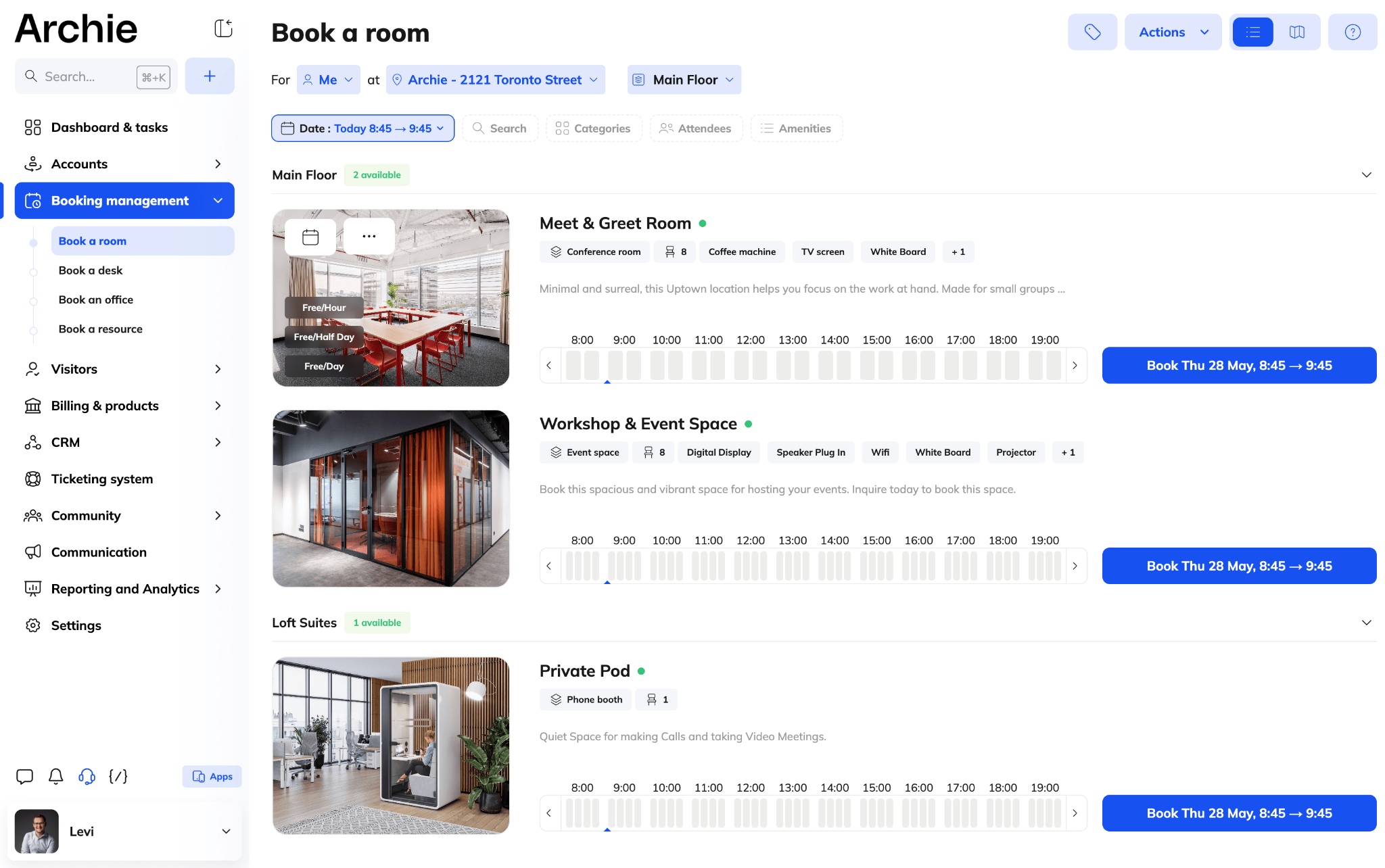
This is where Archie starts separating itself from lighter coworking tools. You can manage meeting rooms, desks, private offices, phone booths, lockers, parking spaces, printing credits, and custom office equipment. You can also create access rules by membership tier, group, company account, or zone.
Booking flexibility is excellent
Members can book through the mobile app, the web portal, room displays or kiosks, or via third-party integrations like Google Calendar, Slack, or Microsoft Teams & Outlook. I especially like the flexibility here because coworking members behave (and work!) differently.
What Could Be Better
Smaller coworking spaces may find Archie too powerful
Archie is built for operational depth and scale, which is great once you’re growing. But if you’re running a very small coworking space with simple workflows, Archie may feel heavier than necessary.
There are lighter tools that handle basic bookings and billing with less setup. Speaking of…
Setup can take some time
Archie has a lot of depth, and that means the setup needs to be done properly. If you only use it as a basic booking tool, you probably won’t get the full value for the price. The real benefit comes when you configure the workflows, automations, access rules, billing rules, and member journeys properly from the start.
That’s not necessarily a weakness, but it is something operators should understand before signing up.
Advanced reporting is good, but not ultra-enterprise level
Archie has solid analytics and reporting, but if you want extremely granular BI-style customization, some enterprise platforms go deeper.
For most operators, Archie’s reporting is more than enough. But very data-heavy organizations may eventually want more customization.
White-label mobile apps cost extra
The branded domain is included on higher plans, but fully white-labeled mobile apps are still an add-on. That’s fairly normal in coworking software, though, but still worth knowing upfront.
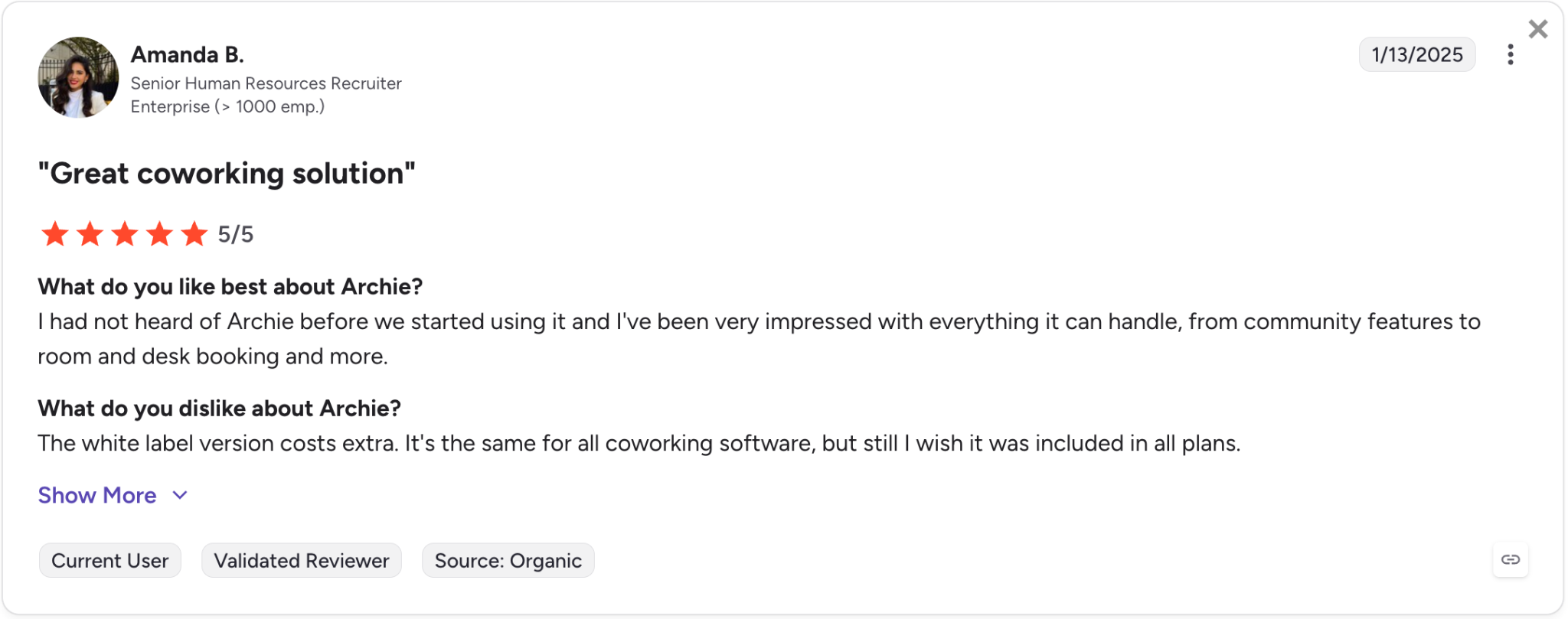
Source: G2
My Experience With Archie
The coworking software market (valued at $2.21 billion by The Business Research Company in 2026, by the way) is quite interesting because most platforms seem similar at first.
Then you realize that some coworking platforms are powerful but feel dated and difficult to implement. Others are clean and simple initially, but you quickly hit limitations once your space grows.
Archie seems to sit somewhere in the middle in a very good way.
Now, to be fair, I don’t think it’s the perfect solution for every coworking space. If you’re running a very small operation with simple workflows, Archie may honestly be more software than you currently need.
My impression was that Archie is best suited for coworking businesses that are past the “we can manage this manually” stage. Basically, if your space is growing, your team is repeating the same admin tasks every week, and your member experience depends on too many separate tools, Archie is exactly the kind of platform I’d be looking at.
If you’re weighing up other platforms too, it’s worth reading my take on the best B2B marketing tools and my HubSpot review to see how I think about evaluating software before committing.
Frequently Asked Questions
How much does Archie coworking software cost?
Archie’s coworking plans start at $165/location/month for Starter and $257/location/month for Pro, with custom pricing on the Enterprise tier.
Does Archie include e-signatures?
Yes. Archie has built-in e-signatures inside the platform, so you don’t need a separate DocuSign or Dropbox Sign integration to send and sign contracts.
Who is Archie best for?
Archie is best suited for coworking spaces that have outgrown manual processes — growing operations with repetitive weekly admin and a member experience spread across too many disconnected tools. Very small spaces with simple workflows may find it more than they need.
What can you book and manage in Archie?
You can manage meeting rooms, desks, private offices, phone booths, lockers, parking spaces, printing credits, and custom equipment, with access rules by membership tier, group, company account, or zone. Members can book via the mobile app, web portal, room displays or kiosks, or integrations like Google Calendar, Slack, and Microsoft Teams & Outlook.