In my years of working on marketing campaigns, I’ve found that one of the most overlooked tools is a well-designed UTM tracking template. Whether you’re managing email campaigns, affiliate partnerships, or paid ads, consistent UTM tracking is critical for accurate attribution and reporting.
In this blog post, I’ll walk you through how to create and use a UTM tracking template that can help your team streamline campaign management and improve analytics insights. I’ll also share examples of how businesses are leveraging such templates to track links across different channels.
Table of Contents:
- Why Use a UTM Tracking Template?
- Building a UTM Tracking Template
- Real-World Applications of UTM Tracking Templates
- How to Use the UTM Tracking Template
- Learn Advanced UTM Strategies
- FAQs About UTM Tracking Template
- Conclusion
Why Use a UTM Tracking Template?
A UTM tracking template is not just a spreadsheet—it’s a structured way to organize and standardize how you create campaign URLs. Here’s why it’s a game-changer:
- Standardization Across Teams: Ensures everyone uses consistent UTM parameters, avoiding discrepancies like fb vs. facebook.
- Improved Collaboration: Teams managing various marketing activities can easily update and share campaign links.
- Enhanced Reporting: Proper UTM tagging ensures that analytics platforms like Google Analytics or HubSpot accurately attribute traffic sources.
- Time Efficiency: Templates, such as an UTM generator Google Sheets, automates the process of generating final URLs, saving time and reducing errors.
Building a UTM Tracking Template
Here’s how to structure your UTM template to make it as effective as possible:
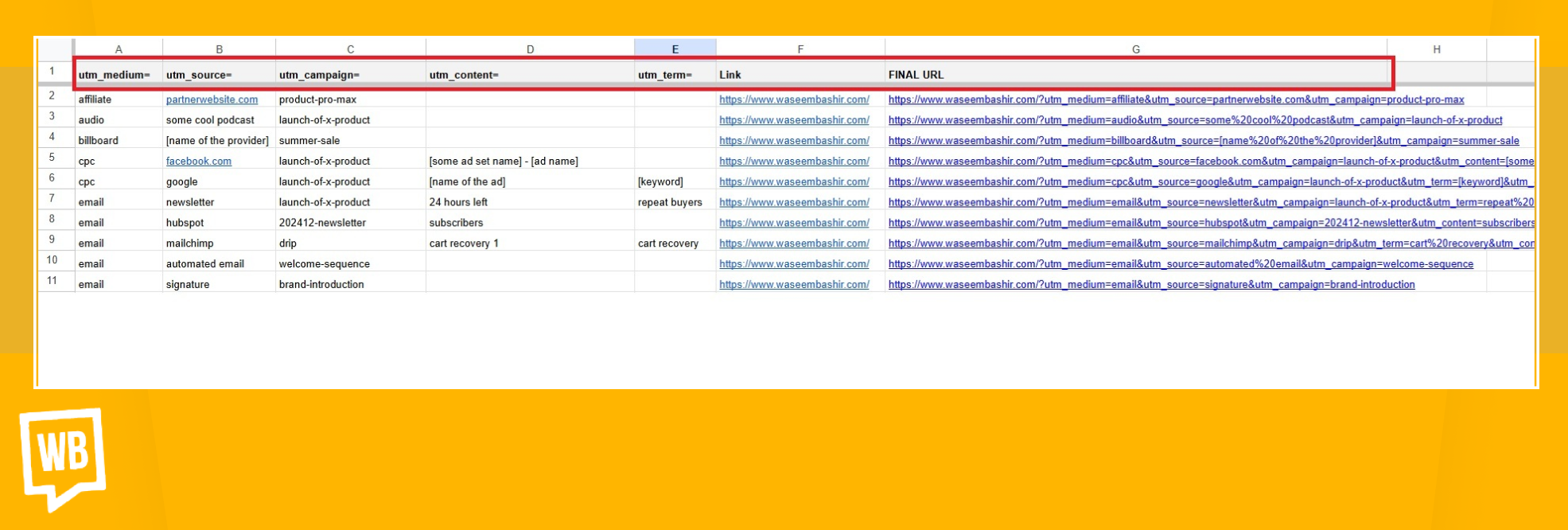
Key Components of the UTM Tracking Template
| Parameter | Description |
|---|---|
| utm_medium | Identifies the marketing channel (e.g., email, affiliate, cpc). |
| utm_source | Specifies the traffic source (e.g., google, newsletter, signature). |
| utm_campaign | Names the campaign (e.g., summer_sale, brand_awareness). |
| utm_term | Tracks keywords or specific targeting (optional, typically used for paid ads). |
| utm_content | Differentiates ads or links (e.g., banner_ad, footer_cta). |
| Destination Link | The base URL of the page you’re tracking (e.g., https://example.com). |
| Final URL | The UTM-tagged URL generated from the above fields. |
Google Sheet Formula for Generating UTM URL
The following formula concatenates UTM parameters into a valid URL:
=F2&”?”&$B$1&SUBSTITUTE;(B2,” ”,“%20”)&”&”&$A$1&SUBSTITUTE;(A2,” ”,“%20”)&IF;(C2<>"",”&”&$C$1&SUBSTITUTE;(C2,” ”,“%20”),"")&IF;(D2<>"",”&”&$D$1&SUBSTITUTE;(D2,” ”,“%20”),"")&IF;(E2<>"",”&”&$E$1&SUBSTITUTE;(E2,” ”,“%20”),"")
This formula ensures:
- Spaces are replaced with %20.
- Parameters are included only if they contain values, keeping the URL clean.
Real-World Applications of UTM Tracking Template
Here are some practical ways businesses have used the UTM tracking template:
1. Email Campaigns
Differentiate traffic from newsletters, automated emails, and personalized email signatures. For example:
- Newsletter: Use a UTM builder spreadsheet to create links like:
utm_source=zoho-email-campaign&utm;_medium=email&utm;_campaign=monthly-newsletter&utm;_content=cta-button
- Email Signatures: Track individual team members’ email signatures to analyze their impact on website visits.
2. Affiliate Marketing
Track specific placements on affiliate websites, such as:
- utm_source=affiliate-partner&utm_medium=affiliate&utm_campaign=radiant-panels&utm_content=header-banner
3. Paid Advertising
Identify high-performing platforms, campaigns, and ad creatives:
- Google Ads: Utilize a Google Ads UTM tracking template to create URLs like:
utm_source=google&utm;_medium=cpc&utm;_campaign=product-launch&utm;_term=keyword1
- Facebook Ads: Track ad performance with links such as:
utm_source=facebook&utm;_medium=cpc&utm;_campaign=lead-gen&utm;_content=video-ad
For a step-by-step guide on adding UTM parameters to Google Ads, check out our blog on:
 How to Add UTM Parameters to Google Ads
4. Social Media
Compare organic and paid performance:
- Organic: utm_source=facebook&utm_medium=social&utm_campaign=brand-awareness&utm_content=organic-post
- Paid: utm_source=facebook&utm_medium=cpc&utm_campaign=brand-awareness&utm_content=carousel-ad
5. Internal Usage
Monitor clicks from internal links, such as:
- Employee email signatures
- Website navigation bars
How to Use the UTM Tracking Template
- Download or Create the UTM Template: Set up a UTM builder spreadsheet with predefined columns for UTM parameters and the final URL formula.
- Enter Campaign Data: Fill in the rows with the appropriate parameters for each campaign.
- Generate Final URLs: Copy the generated links for use in your campaigns.
- Share and Collaborate: Store the UTM template in a shared workspace (e.g., UTM builder google sheets) for team access..
Download the Free UTM Tracking Template
Ready to simplify your campaign tracking? Download my Free UTM Tracking Template and start generating clean, consistent URLs for all your campaigns today.
Learn Advanced UTM Strategies
Want to go beyond UTM templates? My Ultimate UTM Attribution Course teaches you how to track, analyze, and optimize your campaigns effectively. You’ll learn:
- Setting up UTMs for different platforms.
- Capturing and analyzing UTM data in analytics tools.
- Real-world examples and bonus resources.
FAQs About UTM Tracking Template
Can I use this template for platforms other than Google Analytics?
Yes, the UTM tracking template works with any platform that supports UTM parameters, including HubSpot, Mixpanel, and custom CRMs.
What if I don’t use all five UTM parameters?
The UTM template is designed to exclude blank fields automatically, so your URLs remain clean.
How do I ensure consistency across team members?
Use dropdown menus or predefined lists for fields like utm_medium and utm_source to standardize inputs.
Can I track offline campaigns with UTMs?
Yes! You can generate UTM-tagged URLs in an UTM builder spreadsheet and convert them into QR codes for offline campaigns.
How do I manage hundreds of UTM links?
For teams managing a high volume of campaigns, an UTM template in Google Sheets can be paired with a URL shortener like Bitly or Rebrandly to simplify sharing and tracking.
Conclusion
This blog post is designed to highlight the versatility of the UTM tracking template while incorporating trust-building elements like my experience and actionable steps. For more best practices, refer to the complete UTM marketing guide.
By adopting this UTM template, teams can achieve consistency, accuracy, and efficiency in tracking. Start using it today to simplify your workflow and enhance analytics.
Related Articles:
- How to Set Up WordPress UTM Tracking
- Best Practices for UTM Tracking
- Understanding Traffic Attribution and Direct Traffic
- Why Are UTM Parameters So Valuable to Your Social Listening?
- Custom UTM Parameters for Precise Campaign Tracking
- How to Set Up YouTube Video Tracking Using UTM Parameters?
- Tracking Templates vs Google Ads Scripts
- How to Bulk Add UTM Parameters to Google Ads