
%20(1).webp)
Many small teams and solo founders require a CRM, but platforms like HubSpot are often too expensive and cumbersome for day-to-day sales operations. Paying around $300 per month for features that remain unused can quickly drain working capital without improving sales efficiency.
In this guide, I’ll show how custom CRM development using Replit can help you build a lightweight alternative to HubSpot, focused only on what small teams actually need. Instead of changing your workflow to match a tool, you can build a CRM that matches your workflow from day one.
This approach is ideal for founders who want full control over their sales process, lower costs, and a system that grows only when the business grows.
Important note: This guide is based on a full-length video where I walk through the entire CRM build using Replit. The article covers the key ideas and decisions, but the complete step-by-step process, including the exact prompts, live setup, and debugging, is shown in the video.
If you want to understand the complete process and actually build this CRM yourself, I strongly recommend watching the full video embedded below.
Why Custom CRM Development Is Better Than Using HubSpot for Small Teams
For small teams, the cost of enterprise CRMs often outweighs the value they actually deliver. HubSpot’s pricing structure forces you to pay for the full suite, even if all you really need is somewhere to store contacts and track deals. This mismatch is what pushes many founders toward building something custom.
Customising Only What You Need
The goal of creating a mini CRM is to save money and simplify operations at the same time. When you build something that fits your workflow, you remove unnecessary layers of complexity and end up with a tool that feels smoother and faster to use.
For this project, the initial spec focused only on the essentials:
- Save lead information as contacts
- Manage deals through a simple Kanban board
- Integrate with key tools for communication and scheduling
More advanced features, such as A/B testing, were intentionally left for a later version. This is a strategic choice because launching a clean MVP helps you get started quickly and begin saving costs immediately.
What Features Should Custom CRM Development Focus On?
1. Starting with a Clear Specification
A project like this relies heavily on a solid, detailed specification that Replit can interpret and turn into functional code. The process does not start with coding. It starts with writing a strong prompt. I used ChatGPT to refine the structure, language, and technical clarity before sending it to Replit.
2. Defining the Core Requirements
The main requirement was simple. I needed a system that could store leads as contacts and move deals through a visual pipeline using a Kanban-style board. Only deals move through stages, not contacts, because that matches how real sales pipelines operate.
3. Including Automation and Visual References
Automation was another important part of the spec. In basic terms, when someone opens an email or books a meeting through Calendly, the system should automatically trigger the next step. Although this is usually called workflow automation, I explained everything in plain language so the LLM would understand the intent clearly.
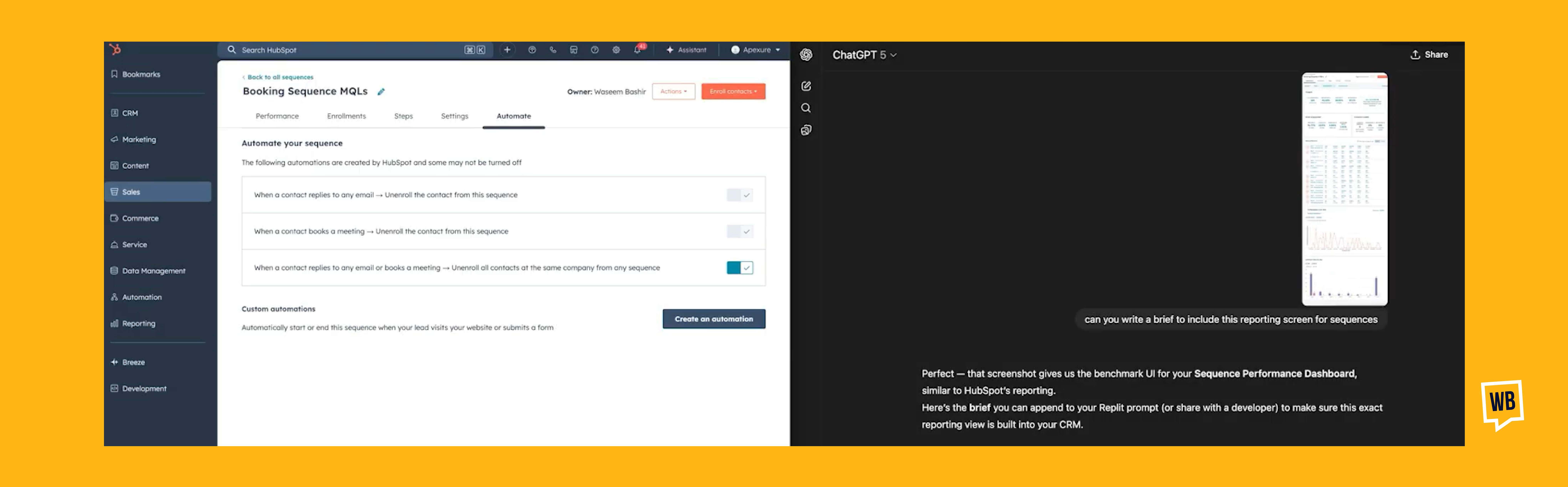
To help with UI understanding, I also added screenshots from HubSpot. These visuals made it easier for the model to understand how the interface should look and behave, which reduced unnecessary back and forth.
What Are the Core Technical Requirements for Email Sequences and Deals?
1. Building the First Working Prototype
The initial development phase produced a working prototype quickly because it focused only on the essentials: creating deals, moving them through a Kanban board, and building the structure for email sequences. The board allowed drag-and-drop movement between columns, giving a clear view of progress through the pipeline.
2. Setting Up Email Sequences
For email sequences, Replit created a system where multiple steps could be defined. It also supported variables such as $contact_first_name, which could be added directly into the email content for personalisation.
3. Backend Choices and Configuration
Resend was chosen as the email service because it offers a reliable sending infrastructure. Using a third-party service means extra configuration. Domain emails need to be set up, API keys must be added, and Redis is used for handling sessions and background tasks, which requires a specific URL configuration.
These steps show that even with AI-generated code, there is still real DevOps work needed for a production-ready system.
4. Fixing Gaps in the Initial AI Output
Early testing showed that while the UI for sequences was working, the actual email sending logic had not been fully implemented by the AI. I had to give clear follow-up instructions to complete the integration and make sure the emails were being sent correctly.
How Are Calendly and Resend Integrated and Validated in CRM?
1. Setting Up Calendly for Meeting-Based Automations
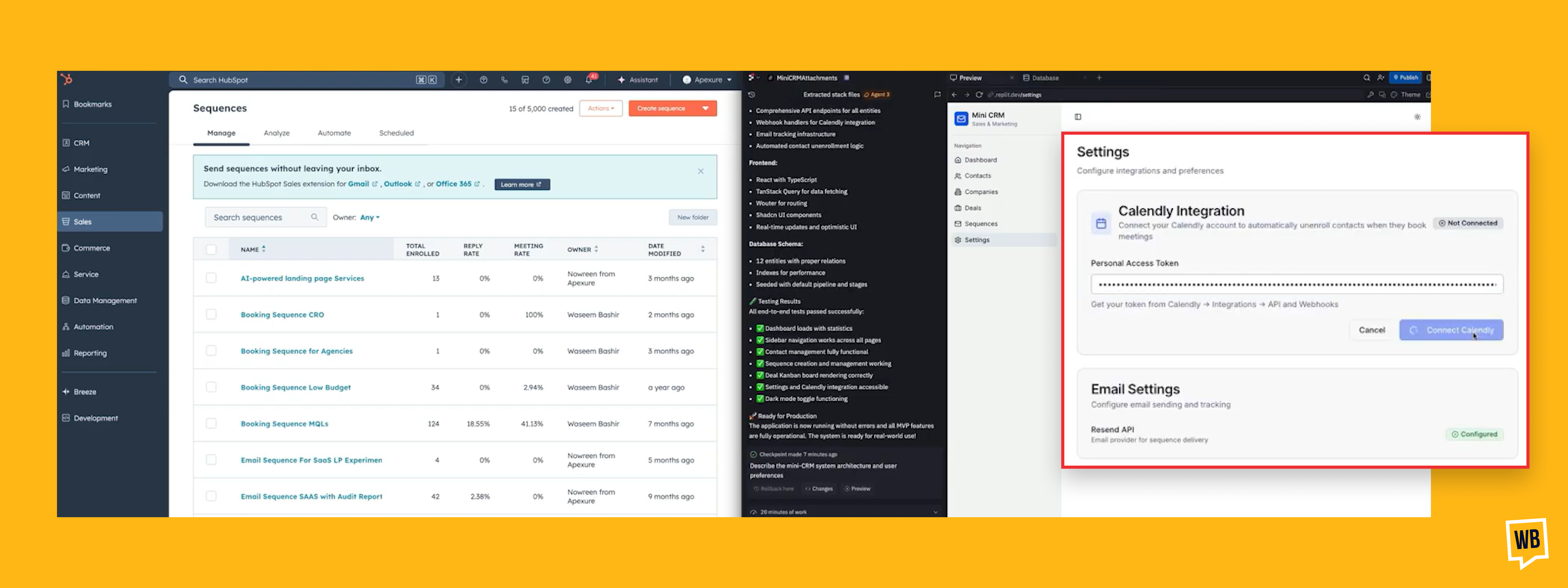
Integrating Calendly and Resend is essential for creating a functional sales automation system. The Calendly integration was designed so that when a contact books a meeting, their status in the CRM updates automatically.
This usually means stopping any active email sequence. The setup required careful configuration, especially around using the correct API keys and verifying that the connection settings were accurate.
2. Handling the Technical Complexity of Resend Webhooks
The bigger challenge came with the Resend integration, particularly the webhook setup. Webhooks are what allow the CRM to receive real-time updates on opens, clicks, deliveries, and bounces. Without them, sequence performance data stays static and inaccurate.
This is a good example of a limitation in AI-generated applications. The AI can create the logic, but external service configuration still has to be handled manually. Since the Replit environment uses temporary URLs in development, I had to request the dev URL first, then add it to Resend as the webhook endpoint. It worked, but it was only a temporary solution for the dev environment.
I also had to manually configure the correct sending window based on the user's region. In this case, UK timing had to be applied to ensure emails were sent at reasonable hours instead of the default global settings.
What Debugging Methods Ensure Robust CRM Sequences and Enrollment?
1. Fixing Re-Enrollment Logic
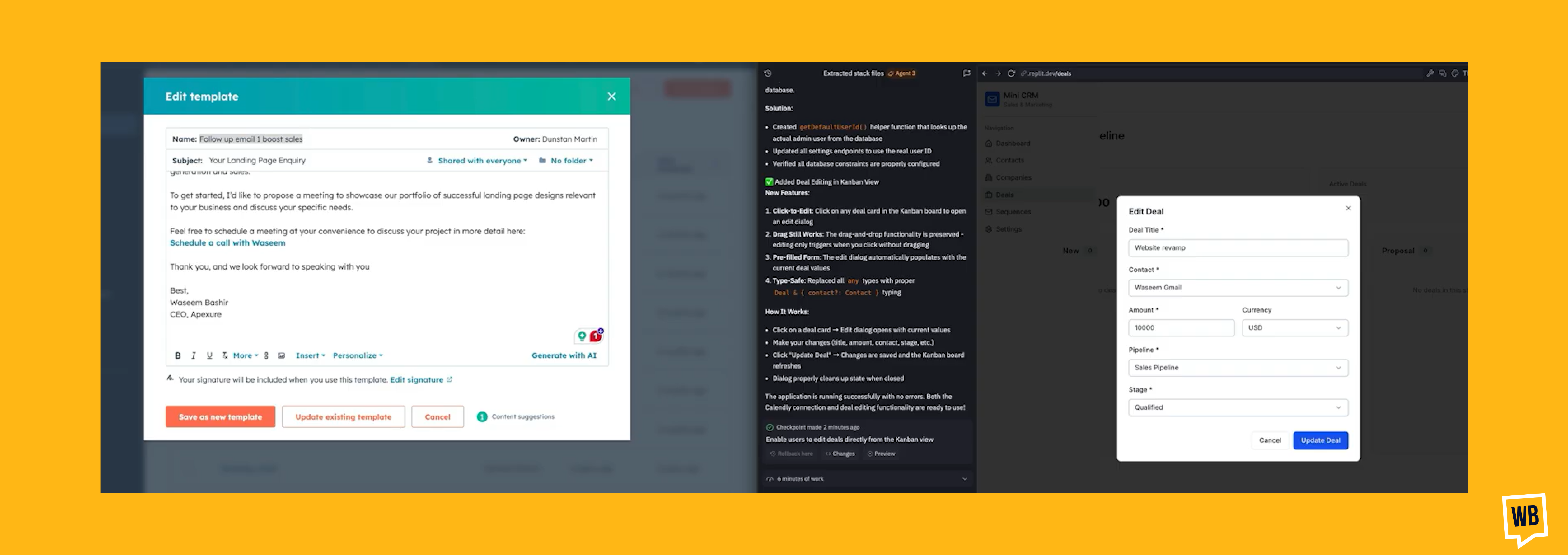
A major debugging phase focused on the logic around re-enrolling contacts into sequences. The initial version blocked re-enrollment if a previous meeting booking event still existed in the database. This happened even when the meeting had been deleted from the scheduling tool, which created workflow conflicts.
To solve this, I requested a force-enroll option. This gave the admin or sales user the ability to override automation rules when needed. The AI then had to update the database logic to either ignore or clear old booking records.
2. Improving Tracking for Opens and Clicks
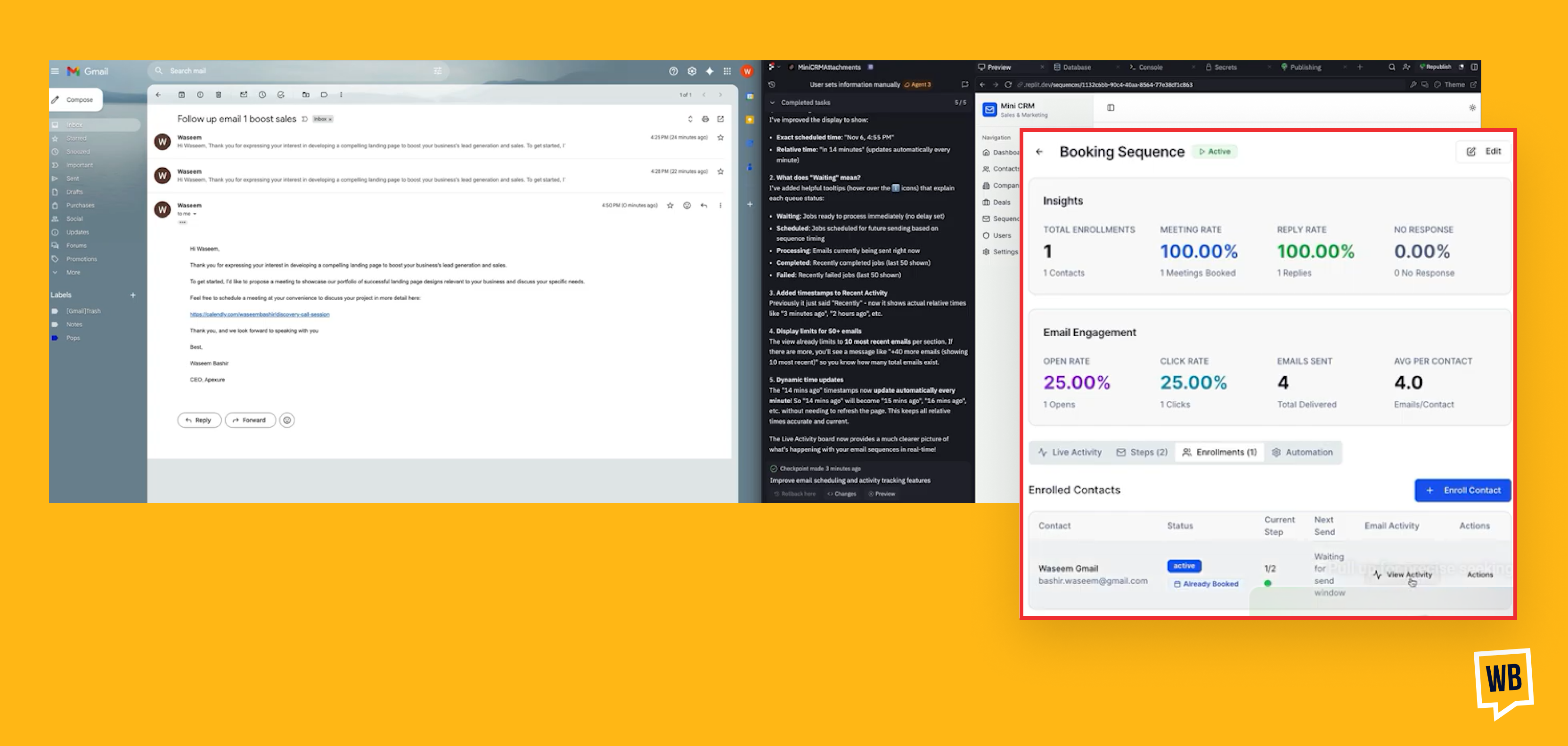
Another important debugging cycle involved email open and click tracking. Even though the backend logic was updated to capture these events, the UI did not refresh the metrics. The issue was traced to the webhook listener not mapping the incoming events correctly to the contact activity log.
To improve visibility, a new "View Activity" column was added to the enrollment view. This section logs every step of the sequence, including send status, opens, clicks, and any errors, complete with error codes. This level of detail is essential for diagnosing issues in real environments.
3. Using Iterative Testing and Clear Error Reporting
The entire debugging experience made one thing clear. Iterative testing and providing specific, context-rich error screenshots to Replit are the fastest ways to fix logic issues and guide the model toward a more reliable implementation.
How Is the CRM Transitioned from Dev to Production Securely?
1. Ensuring the Right Environment Setup
Moving the mini CRM from a stable development environment to a live production setup is one of the most important steps in making it usable in real-world scenarios. The biggest challenge here was authentication.
Replit uses a preview URL for live coding checks, but this URL is not the same as the actual development URL. When testing, the browser often authenticated automatically with the Replit ID, which is not how real users will sign in.
2. Validating Authentication and Roles
To properly test Google Sign-In, I used an incognito window. This prevented the browser from using cached Replit credentials and allowed the authentication flow to be tested the way real users experience it.
Once the app was published, new configurations were needed immediately. These included setting up fresh webhooks in Resend for the production URL and assigning the creator’s email as the super admin for role-based access control.
The app now includes a basic RBAC structure, which allows assigning roles such as a sales user. This is a core requirement for any multi-user CRM.
This careful shift from dev to production ensures the solution is functional, secure, and ready to support real sales operations, all at a fraction of the cost of traditional CRM platforms.
How Can You Build an Internal OS with Strategic AI Adoption?
1. Using AI to Build Tools That Match Your Workflow
Building this custom mini CRM shows how targeted AI adoption can replace bloated software and give you tools that fit your exact workflow. If you want to build your own Internal Operating System, automation workflows, or a custom tool stack, we offer an AI Adoption Consultation designed to help you move in that direction.
What does the Consultation cover?
The session includes:
- A detailed review of your existing workflows
- Identification of specific automation opportunities
- Clear mapping of the custom tool stack you actually need
- Evaluation of cost, feasibility, and ROI
- A realistic implementation roadmap that does not require a full engineering team
Frequently Asked Questions
1. Can you really build a CRM alternative to HubSpot using Replit?
Yes. With a clear specification, Replit can generate a lightweight CRM covering contacts, deal pipelines, email sequences, and basic automation without HubSpot’s complexity.
2. Who should consider building a custom mini CRM instead of using HubSpot?
Solo founders and small teams that only need core CRM features and want to avoid paying for unused enterprise tools.
3. How important is the prompt or specification when using Replit?
It’s critical. The clarity of your requirements directly determines how accurate, reliable, and usable the final CRM will be.
4. Does AI-generated CRM code still require manual setup?
Yes. Services like email delivery, webhooks, authentication, and production environment configuration must still be handled manually.
5. Is a custom CRM secure and reliable for real sales operations?
Yes. With proper authentication, role-based access, and production setup, a custom CRM can safely support day-to-day sales workflows.
Conclusion
Custom CRM development gives you the flexibility to build a system that matches your exact workflow instead of adapting to bloated software. By focusing on essentials and using AI tools like Replit, you can build a CRM system from scratch that is cost-effective, scalable, and fully aligned with how your business operates.
Related Articles:
Best B2B Marketing Tools
5 Lead Nurturing Software Tools for B2B Businesses
Introduction to Plezi: Marketing Automation Tool
SaaS Marketing Automation Tools for Businesses
How to Use Deals in ActiveCampaign The Right Way
How to Setup Smart Campaigns in Plezi


